


When words fail to come, the silence can feel deafening. For millions of Americans facing communication disorders, every unexpressed thought and unshared feeling creates a barrier between them and the world. Yet within this challenge lies remarkable hope through augmentative communication tools that transform silence into connection.
These innovative solutions range from simple picture cards to sophisticated speech-generating devices. Each tool represents a bridge to meaningful interaction for individuals who struggle with traditional speech. The journey toward effective communication often begins with understanding which assistive technology best matches individual needs and abilities.
AAC devices have revolutionized how non-speaking individuals participate in daily life. From classrooms to therapy centers, these tools empower users to express preferences, share emotions, and build relationships. The spectrum of available options ensures that people with varying communication disorders can find suitable solutions.
The impact extends beyond basic expression. These technologies foster independence and dignity for users while providing families with new pathways to connect with their loved ones. As assistive technology continues to evolve, the possibilities for enhanced communication grow exponentially.
Parenting a child with unique developmental or learning needs can feel overwhelming, but informed guidance can make the journey more empowering. The Parenting & Family section provides practical strategies for communication, behavioural support, emotional connection, and building a calm home environment. Parents can explore related insights in the Special Needs Awareness category to better identify early signs and understand underlying needs. For clarity about developmental progress, the Developmental Milestones resources offer age-specific benchmarks that help caregivers set realistic expectations. When learning challenges arise, the Learning Disabilities category provides targeted support strategies for school and homework. For emotional wellbeing—both for children and parents—PsyForU.com offers mental-health tools rooted in psychology. Those wanting to build stronger routines, reduce stress, or cultivate intentional family habits can enhance their journey with guidance from IntentMerchant.com. These connected platforms ensure that parents never feel alone and always have trusted support at every step.
Key Takeaways
- AAC devices provide essential communication solutions for individuals with speech difficulties
- Options range from low-tech picture boards to high-tech speech-generating systems
- Proper selection of assistive technology depends on individual abilities and needs
- Communication disorders affect millions but can be addressed through appropriate tools
- Early implementation of augmentative communication supports language development
- Success requires consistent use across home, school, and community settings
Understanding Augmentative and Alternative Communication (AAC)
Augmentative and Alternative Communication (AAC) offers a wide range of tools and strategies. These help people who struggle with speaking. From simple communication boards to advanced speech generating devices, AAC bridges the gap for nonverbal communication.
It lets people express their thoughts, needs, and feelings in different social settings.
What Are AAC Devices and Who Benefits From Them
AAC devices come in both simple and complex forms. They help people of all ages and abilities. There’s no need for special skills to use them.
Those who can benefit include:
- Individuals with Autism Spectrum Disorder (ASD)
- Stroke recovery patients experiencing aphasia
- People with Cerebral Palsy or Down Syndrome
- Those diagnosed with ALS or apraxia of speech
- Patients recovering from surgery or accidents
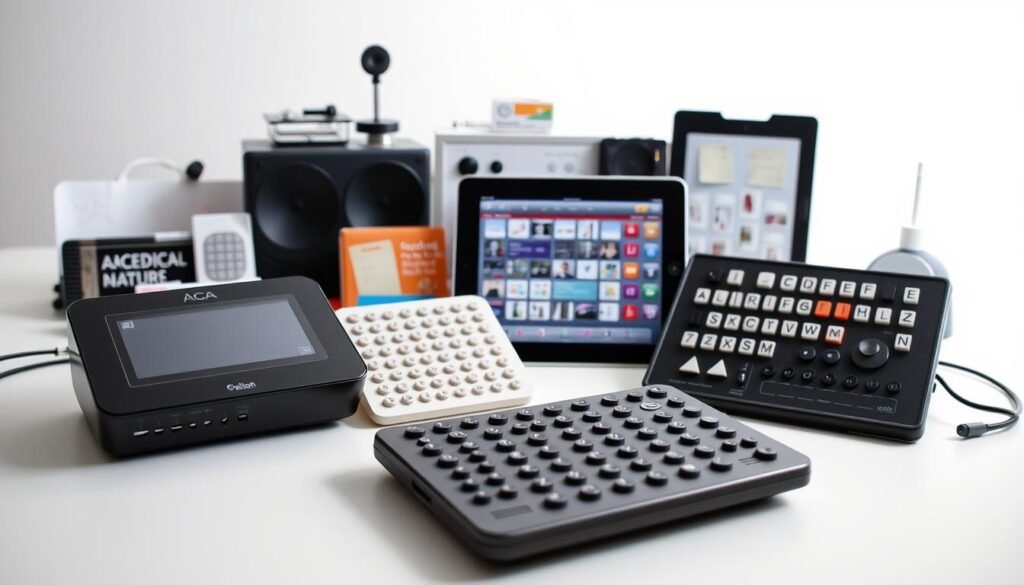
Types of Communication Disorders That AAC Addresses
AAC technology helps with various communication challenges. It offers alternative ways to express oneself. Speech generating devices provide voice for those who can’t speak clearly.
Communication boards help those who find it hard to speak due to physical or cognitive issues.
The Role of AAC in Language and Social Skills Development
AAC is key for language growth and social skills. It reduces frustration and anxiety by providing reliable ways to communicate. Users develop stronger language skills and feel more confident in social situations.
Through AAC, individuals learn to communicate naturally and effectively.
Picture Exchange Communication System (PECS) Fundamentals
The Picture Exchange Communication System is a key method in special education. It lets people communicate by exchanging picture cards. This way, they can have meaningful talks without speaking.

PECS uses pictures to stand for things, actions, and ideas. Users pick images from their book or board to share their needs or thoughts. This method focuses on social interaction, making it unique.
The ARASAAC database has over 9,000 symbols for PECS. These symbols cover everything from basic needs to complex ideas. Users put these images together to make sentences, improving their communication.
PECS is easy to use and doesn’t need any special equipment. Even young children can start using it. It’s also great for adults with intellectual disabilities because it’s simple and empowering. It works for people with autism, developmental delays, and other communication challenges.
High-Tech AAC Devices and Speech Generating Technology
Technology has changed how people with communication challenges speak. Today, we have high-tech AAC solutions like special hardware and software apps. These tools help users be independent by adapting to their needs.
Dedicated AAC Devices vs Communication Apps
Speech-generating devices are mainly two types. Dedicated devices from Tobii Dynavox and PRC-Saltillo are made just for talking. They’re tough and often covered by insurance. Apps like Proloquo2Go and LAMP Words for Life work on tablets, costing less but being flexible.
Dedicated devices are reliable and offer special support. Apps are portable and get updates often. Many start with apps to try AAC before buying dedicated devices.
Voice Output Communication Aids and Their Features
Voice output aids range from simple buttons to complex systems. Basic devices like the BIGmack record one message. Advanced systems hold thousands of words, letting users make complex sentences. They also have natural voices in many languages, making talking feel real.
| Device Type | Message Capacity | Best For |
|---|---|---|
| Single Message | 1-2 phrases | Beginning communicators |
| Multi-Message | 8-32 phrases | Choice making |
| Dynamic Display | Unlimited | Complex communication |
Eye-Tracking Technology in Modern AAC Systems
Eye-tracking tech lets people with severe disabilities talk. Systems like the Tobii I-Series pick words by where you look. This is a big help for those with ALS or cerebral palsy who can’t use touch.
Popular AAC Apps: Proloquo2Go and TouchChat
Two leading apps, TouchChat and Proloquo2Go, have changed how people with speech challenges communicate. They are top choices among AAC systems for their features and ease of use. These apps let users express themselves through symbols, words, and phrases on digital boards.
TouchChat Features and Board Customization Options
TouchChat has communication boards for different needs and ages. Users can pick from Word Power boards with 20 to 80 buttons per page. It offers specialized boards for various groups, from simple ones for developmental delays to complex ones for teens.
Customization options make TouchChat fit individual needs:
- Hide or show buttons based on user abilities
- Set up gesture controls for faster access
- Transition smoothly to dedicated speech devices
- Adjust vocabulary complexity as skills develop
Proloquo2Go’s Core Word System and Motor Planning
Proloquo2Go uses a core word system where common words stay in the same spots. This helps with motor planning, making it easier for users to move their hands. The app has 23 grid sizes and over 25,000 symbols for full expression.
It offers more than 100 voices in various languages and bilingual support. Users can switch languages mid-sentence. Proloquo2Go and TouchChat provide online training and support resources.
Comparing Price Points and Platform Availability
| App Name | iOS Price | Other Platforms | Key Strength |
|---|---|---|---|
| TouchChat | $299.99 | Windows compatible | Word Power boards |
| Proloquo2Go | $249.99 | macOS: $124.99 | Core word system |
Both apps are big investments in communication. TouchChat costs $299.99, while Proloquo2Go is $249.99 for iOS. The macOS version of Proloquo2Go is $124.99, making it more affordable for Apple computer users.
Selecting Age-Appropriate AAC Tools
Finding the right AAC devices for people with communication disorders is key. It’s about matching technology to their developmental stage. Each person’s skills and abilities guide which tools will help them most.
Young children with developmental delays need special tools. TouchChat offers boards with simple words and big buttons. These designs help them learn to communicate by making it easy to press buttons.
Teenagers have different needs when it comes to communication tools. Standard boards don’t meet their needs for social and emotional expression. TouchChat has boards made for teens, with words from real teenage homes. These boards offer complex language and big buttons for those with motor challenges.
The Avaz AAC app is another great option. It’s for kids with autism and other communication disorders. It uses animations to keep attention and teaches through consistent motor planning. This helps users communicate faster.
Choosing the right tool isn’t just about age. Some people need graphic symbols and words to help with reading. Others prefer simple word-only systems to reduce visual work. It’s important to look at what they can do now and what they might do later.
Low-Tech Alternative Communication Methods
Not every communication solution needs batteries or screens. Low-tech methods are reliable and easy to use anywhere, anytime. They are great when technology fails or when quick, simple communication is needed.
Communication Boards and Symbol-Based Systems
Communication boards are very useful. They use pictures, symbols, or letters in a grid. Users point to them to share their needs and thoughts.
Picture Communication Symbols (PCS) and SymbolStix are popular. They have clear images that everyone can understand.
To make good communication boards, pick words that fit the user’s life. Basic boards might have:
- Core words like “want,” “help,” and “more”
- Food and drink options
- Common activities and places
- Emotional expressions
Manual Signs and Gesture-Based Communication
Sign language and gestures are natural ways to communicate. American Sign Language (ASL) is a full language. Simple gestures can also meet basic needs.
Natural gestures everyone understands include pointing, nodding, and facial expressions. These are key to human interaction and are powerful when speech is not possible.
Implementing Augmentative Communication in Daily Life
Starting your journey with augmentative communication needs careful planning and regular practice. Families and teachers can make it a part of daily life by using strategies that boost confidence and skills. This approach helps everyone involved.
Starting With Simple Words and Phrases
Beginners with aac devices should start with basic words. Focus on words that are used a lot and help with quick communication:
- Core words: yes, no, more, stop, help
- Basic needs: eat, drink, bathroom, sleep
- Social phrases: hello, goodbye, please, thank you
- Feelings: happy, sad, tired, hurt
As users get more comfortable, they can learn more specific words. For example, “I want pizza” or “I’m excited for swimming.”
Modeling AAC Use for Effective Learning
Studies show that seeing others use augmentative communication helps learners. Parents and teachers should show how to use devices during everyday talks. They should point to symbols, press buttons, and show how devices work in real life.
Good modeling means talking about daily tasks, showing feelings, and asking questions. This shows users that their devices are for real communication.
Creating Supportive Communication Environments
Success with augmentative communication depends on the environment. It should encourage everyone to participate:
| Environment Element | Implementation Strategy |
|---|---|
| Wait Time | Allow 10-15 seconds for responses before prompting |
| Device Access | Keep AAC tools within reach during all activities |
| Communication Partners | Train all caregivers in basic device navigation |
| Practice Opportunities | Create natural moments for choice-making throughout the day |
Building confidence takes time. Always celebrate attempts at communication. Respect the time it takes to process and keep expectations the same everywhere.
Assistive Technology Beyond Basic Communication
Modern assistive technology does more than just send messages. It now supports independence, social interaction, and even emergency responses. These tools grow with users, keeping communication open and clear.
SimpliHere is a top pick for ALS patients, costing just $3.99. It offers easy messaging, voice commands, and forums for support. The Louise voice assistant responds to voice commands, and it saves users’ voices before they change.
MyTalkTools Mobile works on Apple Watch, iPhone, iPad, and Apple TV. It has features like auditory scanning and adjusts to different physical abilities. This ensures users can keep using it as their skills change.
| AAC App | Key Features | Price | Best For |
|---|---|---|---|
| SimpliHere | Voice banking, Louise assistant, community forums | $3.99 | ALS patients |
| MyTalkTools Mobile | Multi-device support, auditory scanning | $99.99 | Physical limitations |
| Assistive Express | Word prediction, phrase favorites | $24.99 | Conversation efficiency |
Assistive Express makes talking easier with smart word prediction. For $24.99, it learns your words and stores favorites. This makes talking easier for those with less energy or mobility.
Nonverbal Communication Tools for Different Settings
Non-verbal communication tools fit into many places where people need other ways to talk. Each spot has its own set of challenges and chances for using AAC. Whether it’s a classroom or outside, picking the right tools helps everyone communicate well all day.
Classroom Communication Solutions
Schools need smart placement of nonverbal tools to help students join in. Wall-mounted AAC devices near whiteboards let students answer questions. Communication boards at activity centers help with group work. Teachers use tablets with apps like Snap + Core First or LAMP Words for Life for class talks.
For a classroom to work well, consider:
- Visual schedules with symbol cards for daily routines
- Communication strips attached to desks for quick responses
- Shared AAC devices at learning centers
- Symbol-based choice boards for picking activities
Wearable AAC Devices for On-the-Go Communication
Wearable aac devices change how non-speaking people move around. Devices like the GoTalk NOW wristband or QuickTalker 7 let people quickly say important things. They stick to clothes or arms, making sure people can talk during sports, playtime, or trips out.
Home and Therapy Applications
At home, non-verbal tools are part of daily life. Families use simple choices like a board on the fridge for meals. Therapy uses special AAC software to track and learn new words. The Tobii Dynavox I-Series is great for both, helping those who can’t move much.
Choosing the Right AAC Device Based on User Abilities
Finding the right AAC device is all about understanding each person’s needs. Everyone with communication disorders is different. We need to look at many factors to find a device that fits their current abilities and future goals.
Assessing Cognitive Level and Communication Needs
Starting with a cognitive assessment is key. For those with basic skills, simple boards work great. But, for those with advanced abilities, devices with lots of words and complex sentences are better. We check things like vocabulary, thinking skills, memory, and how fast they learn.
- Current vocabulary understanding
- Abstract thinking abilities
- Memory retention capacity
- Learning speed
Considering Sensory-Motor Skills and Vision Abilities
How well someone can move and see affects their device choice. Those with trouble moving need big buttons or simple controls. But, those with good fine motor skills can handle more complex devices.
Vision needs vary too. Some need displays that are easy to see, while others prefer audio feedback. Touchscreen sensitivity adjustments help with shaking hands or light touch.
Consulting With Speech Therapists and AAC Specialists
Getting help from experts is vital. Speech-language pathologists and occupational therapists do detailed checks. They look at how someone communicates and their physical needs. AAC specialists then suggest devices based on these findings.
Their advice helps families make the best choice. It ensures the device will help with communication and avoid unnecessary costs.
Training Resources and Support for AAC Implementation
Using aac devices well needs the right training and ongoing help. Many companies that make assistive tech for talking offer lots of resources. These help families, teachers, and therapists use their systems well.
Training materials have several important parts. They help users at every step of using alternative communication tools:
- Product guides and user manuals with step-by-step instructions
- Video tutorials showing how to use it in real life
- Activity guides for practicing talking skills
- Webinars on advanced features and strategies
- Local support for hands-on demos
Big makers of aac devices have different ways to train. TouchChat has a lot of online learning through Saltillo’s training portal. It has free webinars and certification courses. Proloquo2Go has clinical research and learning paths for different users. Avaz has progress tracking in their platform, helping teams see how users are doing.
| Training Resource Type | Best For | Typical Duration |
|---|---|---|
| Online Video Tutorials | Self-paced learners | 15-30 minutes each |
| Live Webinars | Interactive Q&A sessions | 60-90 minutes |
| In-Person Workshops | Hands-on practice | Half or full day |
| Professional Certification | Therapists and educators | Multiple sessions |
Getting better at using assistive tech for talking is important. Teams can get better by going to training sessions. Many places give credits for these. Some makers even offer special services for users who need something different.
Measuring Progress and Overcoming AAC Challenges
Success with aac systems varies for everyone. Some users start showing complex emotions and ideas in weeks. Others take months to learn basic requests. Knowing how to measure progress helps families and professionals support nonverbal communication.
Indicators of Successful AAC Adoption
Look for these signs of aac systems progress:
- Users eagerly reach for their device all day
- They make communication attempts more often, even hourly
- New words come up without needing to be taught
- Social talks get longer and more detailed
- Frustration signs go down as they get better at expressing themselves
Some people with communication disorders surprise their families by using AAC. A teenager might tell why they don’t like certain foods. A child might share their favorite bedtime story.
Addressing Common Implementation Barriers
Several challenges can slow down AAC adoption. Families often want to see results right away. But, learning nonverbal communication takes time. Apps like Patient Communicator help reduce hospital anxiety with simple buttons in 18 languages.
Setting realistic goals helps avoid getting discouraged during the learning process.
Long-Term Benefits for Non-Speaking Individuals
Using AAC for a long time leads to big improvements. Users get better at speaking, join more community activities, and feel less stressed. Some people even start speaking after using AAC for years.
Others use their devices their whole lives. They build strong social connections and reach educational goals they thought were impossible.
Conclusion
The world of augmentative communication has changed a lot in recent years. Now, we have everything from simple picture boards to advanced eye-tracking systems. Free apps like LetMeTalk help, while systems like TalkTablet Pro offer 48 buttons per page and over 30,000 symbols for $199.99. This makes assistive technology affordable for many.
Voice banking is a big step forward in communication devices. It lets users keep their own voice in synthetic speech systems. This adds a personal touch to AAC, helping people stay true to themselves even when speaking is hard. The work on these tools shows how developers, researchers, and users are working together.
Choosing the right AAC device is important. It depends on the person’s abilities and needs. Support from family, teachers, and therapists is key. Patience and understanding help users feel confident in using these tools.
The future of AAC looks promising. Innovations are making these tools more accessible and useful. As they get better, they help more people express themselves. The goal is simple but important: to give everyone the tools to communicate and live their lives fully.
FAQ
What is augmentative and alternative communication (AAC)?
AAC helps people with speech problems talk. It includes simple tools like picture boards and advanced apps. These tools let people express their thoughts and feelings in different ways.
Who can benefit from AAC devices and assistive technology?
Many people can use AAC devices. This includes those with Autism, Cerebral Palsy, and more. It’s for anyone who has trouble speaking.
What is PECS (Picture Exchange Communication System) and how does it work?
PECS uses pictures to help people communicate. It’s easy to use and doesn’t need the internet. Users can make sentences with pictures.
What are the main differences between dedicated AAC devices and communication apps?
Dedicated devices are made just for talking and are often covered by insurance. Apps are cheaper and work on phones and tablets. Devices are durable, while apps are flexible.
How do I choose age-appropriate AAC tools for children versus adults?
Choose tools based on the user’s age and needs. Kids need simple tools, while teens need more advanced ones. Apps like Avaz AAC are great for kids with autism.
What are some examples of low-tech alternative communication methods?
Low-tech methods include picture boards and sign language. Drawing and gestures are also ways to communicate. Mid-tech options like Talkables offer recorded messages.
How do voice output communication aids and speech-generating devices work?
These devices let users speak out loud. They use recorded voices or text-to-speech technology. Some devices even track eye movements for users with limited mobility.
What training resources are available for implementing AAC systems?
Many resources are available, like product guides and videos. Companies like Enabling Devices offer training and support. This helps users and caregivers learn how to use AAC systems.
How can AAC be effectively implemented in classroom settings?
Place AAC devices around the classroom for students to use. This helps them communicate with teachers and peers. Start with simple phrases and gradually add more.
What are the indicators of successful AAC adoption?
Look for signs like more use of devices and better communication. Users should feel less frustrated and more able to express themselves. This leads to a better quality of life.